How to Test Your Lovable, Bolt, or Replit App Before You Ship It
TL;DR: You don’t need Selenium or a test framework to catch regressions in a Lovable, Bolt, or Replit app. Paste the URL, describe the flow in plain English, and let a real browser click through it the same way a user would, screenshotting each step so you can see exactly where it breaks.
You built something with Lovable, Bolt, or Replit and it works. You clicked through it yourself and it looked right. But “I clicked through it” isn’t a test plan, and the next prompt you send to add a feature might quietly break the one you already shipped. Here’s a practical way to actually test it before your users find the bugs for you.
Start with the flows that matter most
You don’t need to test everything on day one. Start with the paths that would actually hurt if they broke: can a new visitor sign up? Can a returning user log in? Does the primary action of your app, such as booking, checkout, or submitting a form, complete without an error? These three or four flows are usually where real damage happens, and they’re the easiest to describe in plain English because you already know them by heart.
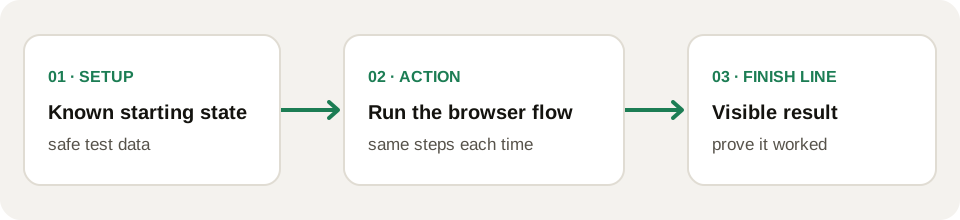
Before automating one, write down its starting state, action, and visible result. For a booking app, use an available test slot, submit the booking, then reload the confirmation page and check that the slot is no longer available. If the slot was already taken at the start, the run cannot tell you whether the booking flow regressed.
Describe the test the way you’d describe it to a person
This is the part that trips people up coming from a “no QA tooling” background. You don’t need Selenium syntax or a testing framework’s API. With WayRunner, you paste your app’s URL and write the instruction the same way you’d explain it to a new hire: “Sign up with a new email, confirm the account, and check that the dashboard loads with an empty state.” A Planner reads that instruction and breaks it into concrete browser steps; a real Chromium browser executes them one at a time, and you watch a screenshot after every step.
Handle login without pasting your password into a chat
Most meaningful flows sit behind a login. For an authenticated run, store a dedicated test account in WayRunner’s encrypted vault. When the run needs it, unlock the vault in your browser and approve the supply to the short-lived Secret Broker. The Planner sees a reference to the credential, not the password itself. Use an account that cannot charge a real card, send real messages, or change production access.
Watch it fail and read why
The value isn’t just in the green checkmark. When a step doesn’t do what you expected, you get the screenshot from that exact moment and a description of what the assertion found instead. That’s usually enough to tell whether the bug is in your app or in the instruction you wrote; no stack trace required, because there isn’t a stack, just a browser doing what a user would do.
Make it a habit, not a one-off
The real payoff shows up on your second and third rounds of AI-generated changes. Re-run the same plain-English test after each new feature prompt, and regressions show up in minutes instead of in your users’ inboxes. For apps that live entirely in a builder like Lovable, Bolt, or Replit, this is the closest thing to a safety net that doesn’t require you to learn to write code. If you’re wondering why traditional QA tooling doesn’t fit this workflow in the first place, we get into that in QA testing for AI-built apps: what changes when you skip the code.
Keep the starting state stable between runs. Reset or recreate test data when needed, and compare the same visible finish line after each publish. Otherwise a failed run might be telling you that yesterday’s account or booking was already used, not that today’s change broke the app.
Try it on your own app: wayrunner.run/#signup.